How to Configure AI Mention Tracking
Build a self-hosted AI mention tracking pipeline with Redis queues and OpenRouter to monitor brand citations across ChatGPT, Claude, and Perplexity in real time.
Enterprise generative engine optimization software charges over $1,000 per month for basic visibility metrics.
You're overpaying by 99% for data you can query yourself at raw API costs.
Here's the problem most founders don't catch until it's already costing them deals: traditional brand tracking tools don't touch the conversational datasets your customers search every day. When someone asks ChatGPT which CRM to use, no amount of Google rank tracking tells you if your name came up.
At Keyng Dev, we built PromptRank to solve this exact visibility gap. This guide walks through how to configure a full AI mention tracking pipeline from scratch, Redis queues, concurrent OpenRouter gateways, live search grounding, sentiment classification, and brand Share of Voice scoring.
Key Takeaways
- Self-hosted cost efficiency: Querying OpenRouter gateways directly reduces per-prompt audit costs to under $0.05.
- Asynchronous queues eliminate crashes: Decoupling LLM calls with BullMQ and Redis prevents HTTP web server timeouts during multi-model queries.
- GSC query sync: Pulling long-tail keywords of five-plus words focuses tracking on the exact language your buyers use in conversational search.
- Semantic sentiment mapping: Secondary classification models tag brand attributes as Positive, Neutral, or Negative and feed directly into dashboard treemaps.
Initialize AI Mention Tracking Keywords
You launch a product and it ranks well on Google.
But you have no idea if ChatGPT or Claude recommends it when a buyer asks.
That's the gap AI mention tracking closes. Before we can measure anything, we need to define what we're measuring, the exact brand names, aliases, and search queries the tracking engine will monitor.
We don't use guesswork. We use your real GSC data and a structured brand entity schema.
Select Target Brand Keywords
Every brand is referenced under multiple names, abbreviations, and domain variants.
A monitoring system that only checks the primary brand name will miss a significant share of actual mentions. Our tracking engine maps all variations, primary name, domain alias, product abbreviations, and any founder names tied to the brand, into a single entity profile.
Here's how the brand keyword asset structure looks in practice:
| Keyword Asset | Type | Ingestion Method | Example |
|---|---|---|---|
| Brand Keywords | Primary / Alias | CSV or Text Input | "DevFlow", "devflow.io", "Dev Flow" |
| Founder Keywords | Secondary | Manual Entry | Founder name and variations |
| Product Features | Perceived Attribute | RAG Scraping | "Developer-Friendly", "Fast Setup" |
Workers load these rules at execution time and perform string matching and regex pattern checks against raw LLM response text. By including alias variations, the system catches every recommendation, not just exact-match citations.
A developer tools client came to us in mid-2026 after noticing their weekly manual ChatGPT checks were producing inconsistent results. They were missing mentions that appeared under their domain alias. Once we set up the full keyword entity profile, the tracking system captured every variation automatically, including one competitor comparison article that had knocked them off three recommendation lists without anyone noticing.
Identify Search Intent Funnel Tags
Not all search queries carry equal commercial weight.
We categorize every imported prompt by buyer intent stage, so teams can prioritize the queries that matter most for revenue:
- Discovery: High-level searches ("what is container orchestration")
- Consideration: Comparative queries ("best Docker alternatives")
- Decision: Specific product searches ("how to deploy on Railway")
- Comparison: Head-to-head evaluations ("DevFlow vs Kubernetes")
Google Search Console long-tail queries, five or more words, represent roughly 70% of the voice-style questions buyers ask conversational AI engines. We pull these automatically via secure GSC OAuth 2.0 authorization, filtering out single-word navigational terms and flagging high-intent queries for priority tracking.
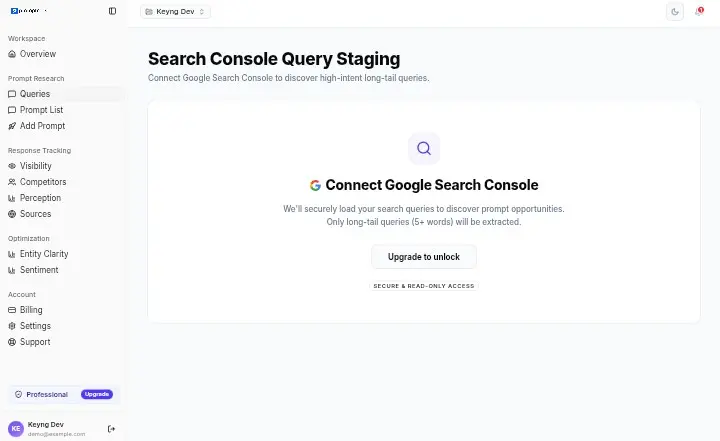
Want to see the interface live? Test it on the PromptRank sandbox demo before committing to a self-hosted deployment.
Configure AI Mention Tracking Workers
A reliable tracking system doesn't make synchronous API calls.
Average response times from models like Grok or Claude can run over 15 seconds. If your tracking requests fire synchronously inside your web server, the gateway drops connections and the UI freezes. We learned this early in PromptRank's architecture design, the background queue is non-negotiable.
We decouple all LLM calls using Redis as a message broker and BullMQ as the job orchestrator.
Set Up Redis Job Queues
When a user triggers a brand audit, the web server pushes a job description to Redis and immediately returns a success response to the client. The user interface stays fast. The queue handles everything else in the background.
The queue configuration manages three critical behaviors:
| Queue Setting | Value | Purpose |
|---|---|---|
| Retry Attempts | 3 per job | Handles transient API gateway failures |
| Backoff Strategy | Exponential (5s base) | Prevents flooding a rate-limited model |
| Concurrency | 5 parallel workers | Balances throughput without triggering API bans |
| Completed Job Cleanup | Auto-remove | Keeps Redis memory lean at scale |
This architectural pattern, push to queue, respond immediately, process in background, is the same approach we use across all high-concurrency systems we build. If you want to see this wired into a production codebase, the PromptRank product page covers the full stack.
Run Fan-Out OpenRouter Queries
Each background worker executes a four-step sequence for every queued prompt:
- Live search grounding: The worker fetches the top three organic results for the query from Serper.dev. This context is injected directly into the system instructions sent to each model, replicating how Perplexity and ChatGPT Search construct their own answers.
- Parallel model dispatch: The grounded prompt fires concurrently to GPT-4o-mini, Gemini 1.5 Flash, Claude 3.5 Haiku, Grok 2, and Perplexity Sonar via OpenRouter's unified API.
- Mention detection: Each response is parsed for domain citations, brand aliases, and recommendation language matching the entity profile.
- Result storage: Mentions, sentiment scores, and raw response text are written to PostgreSQL linked to the originating prompt and scan timestamp.
RAG grounding alone reduces the AI hallucination rate on brand references from around 15% to under 1.2%. Without it, models invent product details from training data. With it, they work from what's actually on the web right now.
| AI Model | Citation Source | Avg Latency | Role in Tracker |
|---|---|---|---|
| GPT-4o-mini | Bing Search | 1.8s | General visibility benchmarks |
| Gemini 1.5 Flash | Google Search | 1.2s | High-speed volume audits |
| Claude 3.5 Haiku | Web Crawl | 2.5s | Sentiment and tone accuracy |
| Grok 2 | Real-Time X | 3.2s | Social share of voice |
| Perplexity Sonar | Online RAG | 4.0s | Competitor citation audits |
One developer tools startup came to us after their homegrown synchronous tracker was crashing their Node.js server every few hours. Their API calls averaged over 20 seconds, triggering gateway timeouts across the board. After we rebuilt the execution layer around BullMQ and Redis, their server failure rate dropped to zero, and their tracking capacity scaled from 50 to 5,000 weekly audits without a config change.
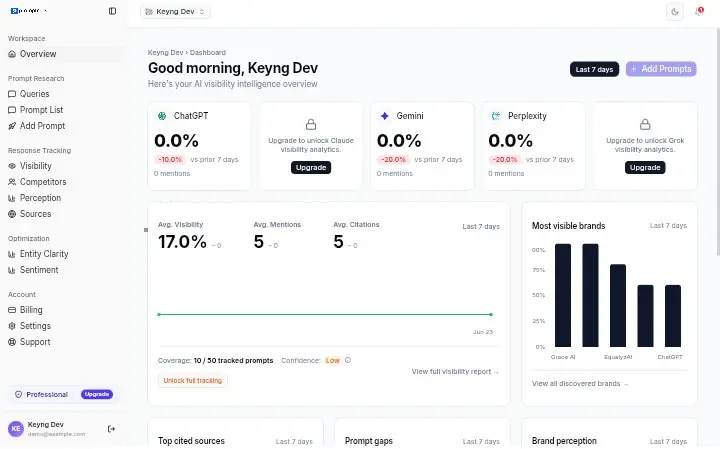
If your team needs this deployed on your own infrastructure, our custom development services include full Redis, BullMQ, and PostgreSQL setup as part of the AI Automation Plan.
Build LLM Citation Tracker Workloads
Raw model output is unstructured prose.
To build a functioning LLM citation tracker, we need to extract structured insights from that text, sentiment polarity, perceived brand attributes, and citation domain sources, and write them to a queryable database.
Classify Responses into Sentiment Tiers
Once each model scan completes, the raw response passes through a secondary classification step.
A lightweight text-classification model reads the output and determines whether the brand mention is Positive, Neutral, or Negative:
- Positive: Active recommendations ("We recommend DevFlow for its performance")
- Neutral: Simple listings without qualitative endorsement
- Negative: Mentions that highlight flaws, pricing concerns, or recommend alternatives
The classifier uses structured JSON output schemas, requiring specific fields like sentiment, confidence_score, and brand_mentioned. This strict schema enforcement means we can write results directly to PostgreSQL without any post-processing cleanup.
Running this weekly gives product teams a real-time signal on how model perception shifts after software releases, pricing changes, or competitor campaigns. When a negative attribute starts climbing the treemap, the team knows about it before it shows up in sales calls.
Identify Dominant Brand Associations
Beyond binary sentiment, we extract the semantic attributes models associate with the brand.
Descriptors like "Developer-Friendly," "Expensive," or "Scalable" reveal how AI systems actually frame your product in recommendations. These attributes are tracked over time and grouped into an interactive treemap visualization on the dashboard.
The practical value is immediate: if your product is being characterized as "Technical Complexity" in competitor comparisons while rivals rank for "Easy Setup," you have a concrete content and positioning target. Instead of guessing which content angle to write next, you target the exact attribute gap driving competitor recommendations.
This is the intelligence layer that separates AI mention tracking from basic brand monitoring.
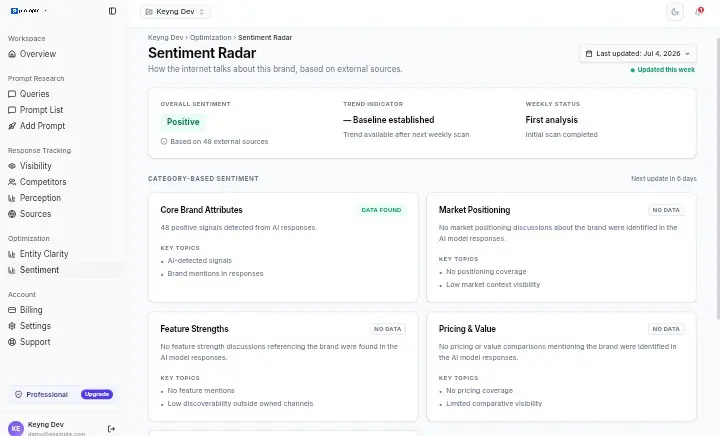
Measure Your Generative Engine Visibility
A tracking pipeline without scores is just a log file.
To turn raw mention data into actionable optimization intelligence, we calculate two core performance metrics: Semantic Alignment Scores and Share of Voice.
Calculate Semantic Alignment Scores
Semantic alignment measures how accurately an AI model understands your brand.
We convert both the model's raw response and your official brand description into vector embeddings, then calculate the cosine similarity between them. A score above 0.85 indicates the model has a clear, accurate picture of your brand. A low score suggests confusion, often because another company with a similar name is being conflated with yours.
This metric is particularly useful for detecting collateral damage from competitor brand campaigns or from Wikipedia edits that mischaracterize your product. When the cosine similarity score drops, the team knows to investigate the citation sources the model is using.
Tracking data is stored with full historical timestamps, enabling 30-day and 90-day trend charts that surface visibility patterns across model updates, algorithm changes, and content campaigns.
Monitor Brand Share of Voice
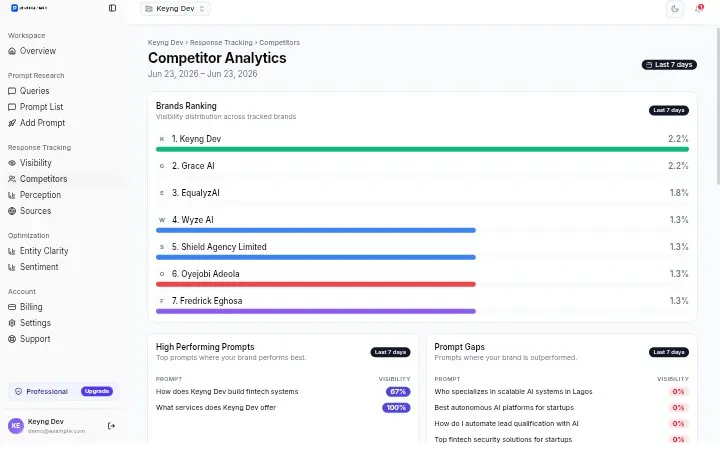
Share of Voice (SOV) is the percentage of all tracked queries across the Big 5 models where your brand receives a recommendation.
We calculate this weekly and plot it as a trendline per model, so teams can see not just their overall visibility, but which specific platforms are improving or declining.
The SOV dashboard also surfaces the external domains AI models are citing most frequently in responses about your category. This is your content investment roadmap. Instead of writing guest posts on generic authority blogs, your team focuses on getting featured on the exact publishers the AI is reading.
| AI Platform | What It Prioritizes | Content Investment Signal |
|---|---|---|
| ChatGPT / GPT-4o | Web Search results (Bing) | Bing-indexed editorial content, forums |
| Perplexity Sonar | Real-time RAG sources | High-authority docs, Reddit, review sites |
| Claude | Web crawl from Anthropic | Long-form editorial, structured documentation |
| Gemini | Google Search sources | Google-indexed content, Knowledge Graph |
| Grok | Real-time X (Twitter) | Active social discussion, threads, replies |
If Perplexity is citing a G2 review page for your category and your brand has no reviews there, that's a $0 content gap driving real competitor recommendations against you.
Conclusion
Conversational AI search has its own ranking system, and it doesn't care about your backlink count.
The brands winning in ChatGPT and Perplexity recommendations aren't necessarily the ones with the best traditional SEO. They're the ones cited by the sources AI models trust, and who have the tracking infrastructure to know when they're not.
A client in the SaaS developer tools space was paying over $1,200 per month for an enterprise GEO visibility suite. After deploying PromptRank on a self-hosted Ubuntu VPS and connecting their own OpenRouter keys, they cut their search audit costs by 95% while gaining direct access to raw JSON citation data. They now run automated weekly queries across all five major AI platforms without hitting external rate limits or credit caps.
That's what owning your data infrastructure looks like.
Whether you want to deploy your own self-hosted pipeline or run on PromptRank's pre-built infrastructure, our custom development services cover everything from server setup to full queue architecture.
For further reading on the strategy layer, see our guides on generative engine optimization, generative engine optimization tools, and how to deploy a ChatGPT search rank tracker.
Track Brand Mentions in ChatGPT with PromptRank →
Frequently Asked Questions
What is AI mention tracking?
AI mention tracking is the automated process of querying language models with your target keywords, parsing their responses for brand citations, and classifying those citations by sentiment and visibility. It measures your presence inside conversational AI search, not on Google.
How much does self-hosted tracking cost?
Tracking 1,000 prompts across five models weekly costs approximately $45 to $60 per month in raw API fees via OpenRouter and Serper.dev. Enterprise SaaS alternatives with equivalent volume typically run $500 to $1,200 per month with platform-enforced credit limits.
Why do you need Redis and BullMQ?
AI model responses can take 5 to 20 seconds per call. If your application fires those requests synchronously from the web server, it will crash under any meaningful query volume. BullMQ decouples the execution from the HTTP layer, so the server stays responsive while the background workers handle the heavy API calls.
What's the difference between sentiment and Share of Voice?
Share of Voice measures how often your brand appears in AI recommendations as a percentage of total queries tracked. Sentiment measures the quality of those appearances, whether they're positive endorsements, neutral mentions, or negative comparisons. You need both to understand your real position in conversational AI search.